Showing posts with label Security. Show all posts

How to Choose a Good Password

Choosing a Good Password


Your password is what tells the computer that you are who you say you are. Until we can do retina scans like in James Bond movies, the password is the best that we can do. But, because your password is like a key to your account, you need to safeguard it. Anyone who has your password can get into your account, and your files. Anyone who can guess your password has it. Anyone who has your password can pose as you. Therefore, you may be held responsible for someone else's actions, if they are able to get your password. You may not wish this to happen.

Tips on safeguarding your password

  • First and foremost, NEVER give your password to anyone. ``Anyone'' means your coworkers, your spouse, your systems administrator. In the event of an emergency, the sysadmin can change your password. Your sytems administrator never has a need to know your personal password. If someone needs to get onto our machines, and has a reason to be here, do not give them access to your account. Speak to the systems staff about us setting up an account for them. We would be very happy to give them one.
  • Make your password something you can remember. Do not write it down. If you really, honestly forget your password, we can easily give you a new one. We'd rather set your password once a month because you forgot it than have someone find it written down and gain unauthorized access to your account.
  • Make your password difficult for others to guess. This is not as hard as it initially seems. See the section below on chosing a good password.
  • DO NOT Change your password because of mail from someone claiming to be your systems administrator, supposedly needing access to your files!! This is a popular scam in some circles. Remember, your systems administrator never needs your password for any reason. If someone needs to ask you to change your password so that they can gain entry to your account, they do not have reason to be there.
We run sophisticated password crackers on the password files of our machines. If we guess your password, you will have to come see a staffer to have it changed. These are the same crackers that the bad guys have access to, so if you have a weak password, it's better if we find out about it first.

How Not to Choose a Password

Here are some of the types of passwords that will be picked up by our crackers:
  • Words in the dictionary.
  • Words in any dictionary.
  • Your user name.
  • Your real name.
  • Your spouse's name.
  • Anyone's name (crackers don't necessarily know that your aunt's middle name is Agnes, but it's easy enough to get a list of 100,000 names and try each one).
  • Any word in any ``cracking dictionary.'' There are lists of words that crackers use to try to crack passwords: passwords that a lot of people use. Some of these lists include: Abbreviations, Asteroids, Biology, Cartoons, Character Patterns, Machine names, famous names, female names, Bible, male names, Movies, Myths-legends, Number Patterns, Short Phrases, Places, Science Fiction, Shakespeare, Songs, Sports, Surnames
  • Any of the above, with a single character before or after it (``8dinner'', ``happy1'').
  • Any of the above, capitalized (``cat'' --> ``Cat'')
  • Any of the above, reversed (``cat'' --> ``tac''), doubled (``cat'' --> ``catcat'') or mirrored (``cat'' --> ``cattac'').
  • We used to tell people that taking a word and substituting some characters (a 0 (zero) for an o, or a 1 for an l) made a good password. This is no longer the case. New crackers have the capability to crack things like this, in certain situations.
  • Words like ``foobar'', ``xyzzy'' and ``qwerty'' are still just plain words. They are also popular passwords, and the crack programs look for them. Avoid them.
  • Any of the sample passwords, good or bad, mentioned in this document.

How to Choose a Good Password

I know that coming up with a good password can be difficult, so here are some guidelines to use.
  • Choose a password that is at least six characters long. This should be long enough to discourage a brute-force attack. Currently, the maximum password length on many Unix systems is eight characters, but if you want to add a few more characters to make it easier to remember, go ahead. Just bear in mind that anything after the eighth character will be ignored (so ``abnormalbrain'' is the same as ``abnormal'').
  • In general, a good password will have a mix of lower- and upper-case characters, numbers, and punctuation marks, and should be at least 6 characters long. Unfortunately, passwords like this are often hard to remember and result in people writing them down. Do not write your passwords down!
  • The license plate rule: take a phrase and try to squeeze it into eight characters, as if you wanted to put it on a vanity license plate.
  • Some people like to pick several small words, separated by punctuation marks of some kind.
  • Put a punctuation mark in the middle of a word, e.g., ``vege%tarian''.
  • Use some unusual way of contracting a word. You don't have to use an apostrophe. One of my favorite passwords was ``kEp*-h&y'': ``kEp'' --> ``keep'', ``*-'' --> ``laser'' (like those signs that you see outside of physics labs), and ``h&y'' --> ``handy''; ``Keep your laser handy!''
  • You can use control characters. Just bear in mind that a lot of them have special meanings. If you use ^D, ^H or ^U, for example, you might not be able to log in again.
  • Think of an uncommon phrase, and take the first, second or last letter of each word. ``You can't always get what you want'' would yield ``ycagwyw''. Throw in a capital letter and a puntuation mark or a number or two, and you can end up with ``yCag5wyw''.
  • Deliberately misspelling one or more words can make your password harder to crack.
  • Use several of the techniques above.
  • Something that no one but you would ever think of. The best password is one that is totally random to anyone else except you. It is difficult to tell you how to come up with these, but people are able to do it. Use your imagination!
10 Security Tips to Protect Yourself

Instant Messenger Hacks: 10 Security Tips to Protect Yourself
Most of us will agree that we are paranoid about email security and hack attacks. We should equally be concerned about the other popular connection device we use – the humble instant messenger. It is also open to some of the privacy risks we associate with emails.
Especially in a business environment, unsecured IM installations are creating backdoors for hack attacks. This threat has increased manifold because nearly all IM’s allow for exchange of files, images, songs and even peer to peer sharing of entire folders.
Spam, worms, Trojans and viruses are familiar email foes. They are no friends of instant messaging either. So how do we pick our friends from our foes? Perhaps by following what Benjamin Franklin said - Distrust and caution are the parents of security.
Also, by putting these 10 habits in place.
  1. Don’t give out your identity
  2. Every IM client asks you to create a screen name. A screen name usually refers to your email ID. Create a screen name which does not touch upon personal information or your real identity. For instance, my screen name is ‘Braniac’ and not ‘Saikat’. And NEVER provide any personal details including credit card numbers and social security number over the internet.
  3. Don’t chat with people not on your contact list
  4. Always vet your contact list with people whom you know something about. Talking with Mr. Anonymous at the other end of space may be fraught with risk. It is possible to discover your computer address (i.e. your IP) from an instant message and that usually is the first requirement for a remote hack attack.Don’t believe everything you read and always verify any information or request for information.
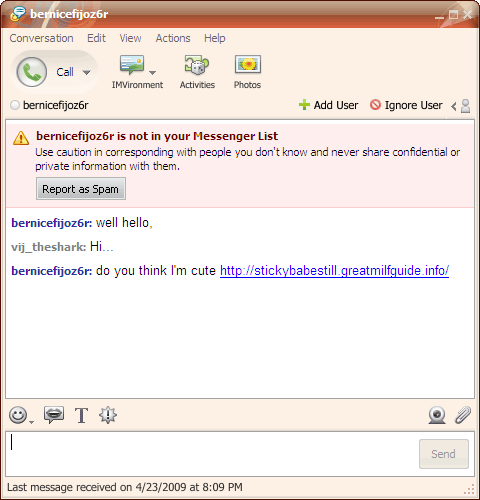
  5. Don’t click on spam links
  6. This is what a spam link might look like –This is probably what you will be bombarded with first. A link tempts you to click it just for the lark. A lot of these links take you to websites which can install spyware stealthily on your computer. For e.g. Viruses and worms with colorful names such as W32.Yalove or W32/Spybot-MQ are potential threats to Yahoo users. Ignore them.
  7. Don’t share files with your chat partner
  8. An IM client like Yahoo allows P2P file sharing. Do not share unknown content even if the person is known. P2P files, like email attachments can carry viruses, Trojan horses, and worms. They are engineered to seed themselves to other members on your buddy list. Be especially cautious when someone sends you an .exe or a .zip file.
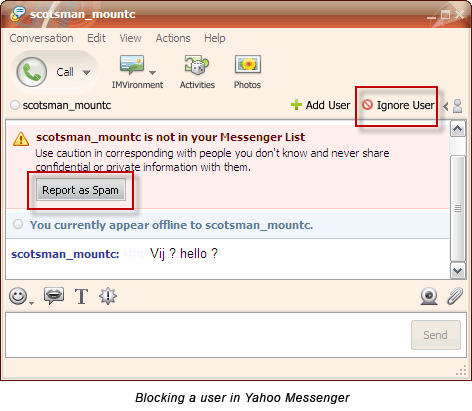
  9. Don’t let potential hackers reach you
  10. Yahoo has an Ignore user or Report as spam so that he can’t disturb you once again. GTalk has a Block user option. Using this option allows you to keep out the unwanted from repeatedly messaging you. The default security settings in chat software tend to be relatively lax. Thus making you open to attacks. Check the settings and preferences of your chat client to apply stricter permission controls.
  11. Don’t Neglect Encryption
  12. Most IM clients lack encryption features. That essentially means that your messages can be tracked and read by eavesdropping hackers using technologies like packet sniffers or similar ones. Passwords are also a security loophole with hardly any client using strong password encryption.The subject of encryption and strong password protection would require another post by itself. So I hand you over to Tim’s excellent post on How To Secure & Encrypt Your Instant Messaging Chats. Here at MakeUseOf.com we have a lot of posts tagged as ‘passwords’. Why not take a look at ways to set strong passwords.
  13. Don’t use an older version of IM – Update
  14. IM client companies spend a lot of effort behind doors to prevent backdoor threats. Newer versions come with bug fixes and enhanced security. For instance, the latest version of Yahoo IM is better integrated with anti-virus solutions like Norton Internet Security and Norton Anti-Virus.So, always update your IM client as soon as one becomes available. If the chat client does not automatically prompt for an upgrade, go to the website and check your version number with the latest available. You can note the version of your particular client by clicking on Help – About
  15. Don’t download third party plug-ins from unverified sources
  16. A lot of third party plug-ins are available for download which enhance the chatting experience. It is safer and advisable to always download from the IM client websites themselves or from verified sources.
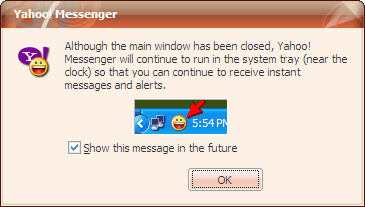
  17. Don’t forget to log-out completely
  18. It is an oft repeated habit to click on the [X] button and exit. But this action does not close our IM client completely. Most often, they continue to run in the system tray leaving it ‘open’ for a third person to access it. IMs also have a nasty habit of broadcasting your online presence even if left to run as a background task. Especially in public computers be mindful of logging out and exiting completely. Also, never click on any Remember My Password checkbox during log-in as an added safeguard.For Yahoo Users: Before you get up, delete your Yahoo Messenger profile. It is located by default at C:\Program Files\Yahoo!\Messenger\Profiles.
  19. Don’t forget the value of a good browser, a good firewall and an even better anti-virus
  20. Sometimes we will click a link; sometimes we will download a file. All the precautions in the world will not be able to protect us if we don’t have a secure browser, a good firewall and an anti-virus updated with the latest virus signatures. These three not only protect us from IM attacks but they are the must-haves for any system.
Chatting as against emailing is a real time activity. It is in that sense more social than any other form of web communication. The danger is that chatting can lull us into a false sense of security. Just a few fundamental forethoughts help us to turn that false sense into a more conscious sense of security.
Have you been hacked? Perhaps, you share the concern for a rigorous defense against hackers? Let us know what safety measures you personally use…